.NET Server Side Events with MongoDB Change Streams
Real-time updates with almost no plumbing
If you want real-time browser updates in ASP.NET Core, you usually think of WebSockets first.
But there is a very nice middle-ground that is often enough for dashboard-style or feed-style UIs:
- MongoDB Change Streams to detect database changes
- Server-Sent Events (SSE) to push those changes to the browser
That gives you one-way, server-to-client streaming with a very small amount of code.
This post walks through the exact demo app and then covers where SSE shines, where it falls short, and when to move up to SignalR.
Demo in action
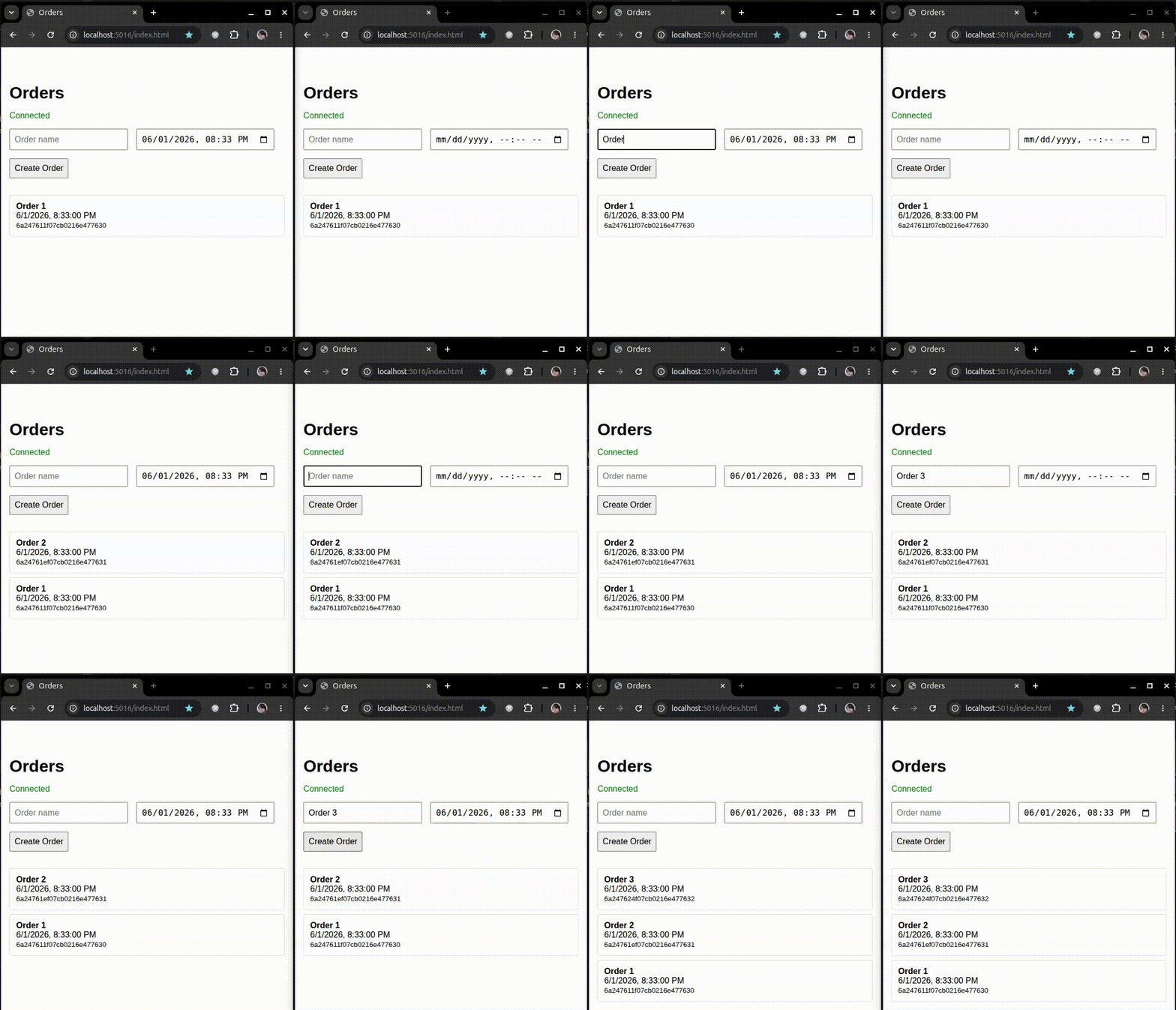
Here is the browser demo in action:
What are Server-Sent Events?
Server-Sent Events are a browser API (EventSource) built for receiving a stream of text events over a single HTTP connection.
Think of SSE as:
- a long-lived HTTP response
- UTF-8 text messages pushed by the server
- automatic client reconnect support
SSE is one-way only (server to browser), which is often exactly what you need for:
- live timelines
- notifications
- audit/activity feeds
- admin dashboards
In ASP.NET Core Minimal APIs, this is now very straightforward using TypedResults.ServerSentEvents(...).
What are MongoDB Change Streams?
MongoDB Change Streams let you subscribe to real-time changes in collections, databases, or entire deployments.
Instead of polling MongoDB every few seconds, you can react to actual insert/update/delete operations as they happen.
At a high level:
- your app opens a change stream cursor
- MongoDB emits change events
- your app maps each change into something your client can consume
For real-time systems, this removes a lot of waste from polling loops.
Wiring it together in ASP.NET Core
Let us build this from scratch.
1) Create the app
dotnet new web -n MongoDbServerSideEvents
cd MongoDbServerSideEvents
dotnet add package MongoDB.Driver
dotnet new web gives us a minimal ASP.NET Core app, which is perfect for a small real-time demo.
2) Replace Program.cs
Use this as your starting point:
using System.Runtime.CompilerServices;
using MongoDB.Bson;
using MongoDB.Bson.Serialization;
using MongoDB.Bson.Serialization.Attributes;
using MongoDB.Driver;

var builder = WebApplication.CreateBuilder(args);

builder.Services.AddSingleton<IMongoClient>(_ =>
	new MongoClient("mongodb://host.docker.internal:27017"));
builder.Services.AddSingleton<IMongoDatabase>(sp =>
	sp.GetRequiredService<IMongoClient>().GetDatabase("test"));
builder.Services.AddSingleton<IMongoCollection<Order>>(sp =>
	sp.GetRequiredService<IMongoDatabase>().GetCollection<Order>("orders"));

var app = builder.Build();

app.MapPost("/orders", async (
	IMongoCollection<Order> orders,
	Order order,
	CancellationToken cancellationToken) =>
{
	await orders.InsertOneAsync(order, cancellationToken: cancellationToken);
	return TypedResults.Ok();
});

app.MapGet("/orders", (IMongoCollection<Order> orders) =>
{
	async IAsyncEnumerable<SseItem<Order>> StreamOrders(
		[EnumeratorCancellation] CancellationToken cancellationToken)
	{
		var cursor = await orders.WatchAsync(
			new EmptyPipelineDefinition<ChangeStreamDocument<Order>>()
				.Match(x =>
					x.OperationType == ChangeStreamOperationType.Insert),
			new ChangeStreamOptions
			{
				FullDocument = ChangeStreamFullDocumentOption.UpdateLookup
			},
			cancellationToken);

		while (await cursor.MoveNextAsync(cancellationToken))
		{
			foreach (var change in cursor.Current)
			{
				if (change.FullDocument is not null)
				{
					yield return new SseItem<Order>(change.FullDocument, "order")
					{
						EventId = EncodeResumeToken(change.ResumeToken)
					};
				}
			}
		}
	}

	return TypedResults.ServerSentEvents(StreamOrders());
});

app.UseStaticFiles();

app.Run();

static string EncodeResumeToken(BsonDocument resumeToken)
{
	return Convert.ToBase64String(resumeToken.ToBson());
}

static BsonDocument DecodeResumeToken(string eventId)
{
	var bytes = Convert.FromBase64String(eventId);
	return BsonSerializer.Deserialize<BsonDocument>(bytes);
}

record Order(
	[property: BsonRepresentation(BsonType.ObjectId)] string? Id,
	string Name,
	DateTime Date);
There are three important ideas in this code:
- We write new orders using a normal HTTP POST endpoint.
- We open a MongoDB change stream and yield each incoming change.
- We expose that stream to browsers as SSE on the same route (
GET /orders).
Notice that both write and streaming code paths use cancellation tokens so work can stop quickly if the request is aborted or the app is shutting down.
2.1) Continue a stream with ResumeAfter and SSE EventId
One really useful feature of MongoDB Change Streams is that you can continue from a known point in the stream instead of always starting “from now”.
In .NET, SseItem<T> gives us an EventId field. We can put the MongoDB resume token in there and set the event type to order.
When the browser reconnects, EventSource automatically sends the last event id in the Last-Event-ID header. We can decode that value and pass it to ChangeStreamOptions.ResumeAfter.
In practice, this means:
- Capture the
change.ResumeTokenfor each event you process. - Encode it and set
SseItem.EventId. - Read
Last-Event-IDon reconnect and map it toResumeAfter.
Here is a minimal version:
app.MapGet("/orders", (
	IMongoCollection<Order> orders,
	HttpRequest request,
	CancellationToken cancellationToken) =>
{
	async IAsyncEnumerable<SseItem<Order>> StreamOrders(
		[EnumeratorCancellation] CancellationToken streamCancellationToken)
	{
		var lastEventId = request.Headers["Last-Event-ID"].ToString();

		var options = new ChangeStreamOptions
		{
			FullDocument = ChangeStreamFullDocumentOption.UpdateLookup,
			ResumeAfter = string.IsNullOrWhiteSpace(lastEventId)
				? null
				: DecodeResumeToken(lastEventId)
		};

		var cursor = await orders.WatchAsync(
			new EmptyPipelineDefinition<ChangeStreamDocument<Order>>()
				.Match(x =>
					x.OperationType == ChangeStreamOperationType.Insert),
			options,
			streamCancellationToken);

		while (await cursor.MoveNextAsync(streamCancellationToken))
		{
			foreach (var change in cursor.Current)
			{
				if (change.FullDocument is not null)
				{
					yield return new SseItem<Order>(change.FullDocument)
					{
						EventId = EncodeResumeToken(change.ResumeToken),
						EventType = "order"
					};
				}
			}
		}
	}

	return TypedResults.ServerSentEvents(StreamOrders(cancellationToken));
});
The key point is that ResumeAfter is not an arbitrary ID; it is the opaque token generated by MongoDB for each change event.
If you are using browsers, Last-Event-ID gives you a clean reconnect story. For non-browser consumers, you can still persist the token yourself and pass it back the same way.
3) Add a simple browser client
Create wwwroot/index.html and add:
<!DOCTYPE html>
<html lang="en">
<head>
	<meta charset="UTF-8">
	<meta name="viewport" content="width=device-width, initial-scale=1.0">
	<title>Orders</title>
</head>
<body>
<h1>Orders</h1>

<div id="status">Connecting...</div>

<form id="orderForm">
	<input type="text" id="name" placeholder="Order name" required />
	<input type="datetime-local" id="date" required />
	<button type="submit">Create Order</button>
</form>

<ul id="orders"></ul>

<script>
	const ordersList = document.getElementById("orders");
	const status = document.getElementById("status");

	function addOrder(order) {
		const li = document.createElement("li");
		li.innerHTML = `<strong>${order.name}</strong><br>${new Date(order.date).toLocaleString()}`;
		ordersList.prepend(li);
	}

	const eventSource = new EventSource("/orders");

	eventSource.onopen = () => {
		status.textContent = "Connected";
	};

	eventSource.onerror = () => {
		status.textContent = "Disconnected";
	};

	eventSource.addEventListener("order", event => {
		addOrder(JSON.parse(event.data));
	});

	document.getElementById("orderForm").addEventListener("submit", async e => {
		e.preventDefault();

		const name = document.getElementById("name").value;
		const date = document.getElementById("date").value;

		const response = await fetch("/orders", {
			method: "POST",
			headers: { "Content-Type": "application/json" },
			body: JSON.stringify({ name, date })
		});

		if (!response.ok) {
			alert("Failed to create order");
		}
	});
</script>
</body>
</html>
4) Run it
dotnet run
Open the app, create a few orders, and you should see each change streamed into the list in real time.
SSE vs SignalR: where each fits
SSE is excellent when you want a lightweight one-way push channel from server to browser. It is easy to reason about, browser-native, and usually simpler to operate than a full duplex setup.
The trade-off is that SSE is intentionally limited. It is text-based, one-way, and less ergonomic when your app grows into richer real-time interactions like rooms, server calls from clients over persistent connections, or advanced client coordination.
This is where SignalR starts to earn its place. SignalR gives you a higher-level real-time programming model, automatic transport negotiation (WebSockets, SSE, Long Polling), groups, hubs, and a mature ecosystem for scaling out.
| Topic | SSE | SignalR | Practical guidance |
|---|---|---|---|
| Direction | Server -> client | Server <-> client | If your UI mostly listens, SSE is often enough |
| Client support | Native EventSource | SignalR client library | If you want richer interaction patterns, SignalR is easier |
| Payload style | Text/event-stream | Structured hub messages | If you need binary or richer protocols, lean SignalR |
| Infrastructure | Simple HTTP streaming | More moving parts, more capability | Choose based on complexity, not fashion |
| Scale-out patterns | Manual design choices | Well-known backplane patterns | SignalR is usually easier at larger scale |
A practical way to choose is:
- Start with SSE when you need fast, simple, server-to-browser updates.
- Move to SignalR when you need bi-directional messaging or richer collaboration semantics.
Also keep in mind one MongoDB-specific caveat regardless of transport choice: Change Streams require a replica set or sharded cluster. A standalone MongoDB server will not work.
Production hardening ideas
If you take this pattern to production, consider:
- project events into lightweight DTOs rather than streaming full documents
- include cancellation support and proper disposal around streaming cursors
- add structured logging for stream open/close/reconnect behavior
- filter change streams as early as possible to reduce noise
- protect endpoints with auth and authorize at data scope
- keep an eye on proxy settings for idle connection timeouts
Moving towards SignalR
SSE is a really strong starting point. But you should move to SignalR when you need more than one-way feeds.
SignalR helps when you need:
- true two-way communication
- protocol negotiation (WebSockets with fallbacks)
- groups and richer hub-based interaction patterns
- scale-out patterns that are already well trodden in ASP.NET Core ecosystems
A natural progression can look like this:
- Start with SSE + MongoDB Change Streams for straightforward live updates.
- Grow into SignalR when clients need to send real-time messages back over the same channel.
- Add a backplane when you scale out across multiple app instances.
If you want to continue using MongoDB in that architecture, you can use Kevsoft.AspNetCore.SignalR.MongoDB as a SignalR backplane.
That gives you the flexibility of SignalR transports (WebSockets, SSE, Long Polling) while still leveraging MongoDB as part of your real-time pipeline.
Final thoughts
For many apps, the pairing of MongoDB Change Streams and SSE is a sweet spot:
- minimal moving parts
- small amount of code
- fast path to real-time UX
Then when requirements evolve, SignalR is a natural next step rather than a rewrite from scratch.
Start simple, get value quickly, and step up transport complexity only when the product actually needs it.